
NEW WEBSITE SEO GUIDE 2026
SEO for a New Website in Australia
Before, During & After Launch
A practical Australian guide to SEO for a new website: plan pages and URLs before design, build SEO in, launch safely, protect rankings during a redesign, measure the first 90 days, and prepare for AI search and GEO using official Google and OpenAI guidance.
WHAT YOU’LL LEARN
Plan Before Design
Map pages, intent, structure and URLs first.
Build SEO In
Content, internal links, mobile and technical foundations.
Launch Safely
Indexing, sitemaps, redirects and launch checks.
Protect Redesigns
Preserve valuable URLs, content and SEO signals.
Measure the First 90 Days
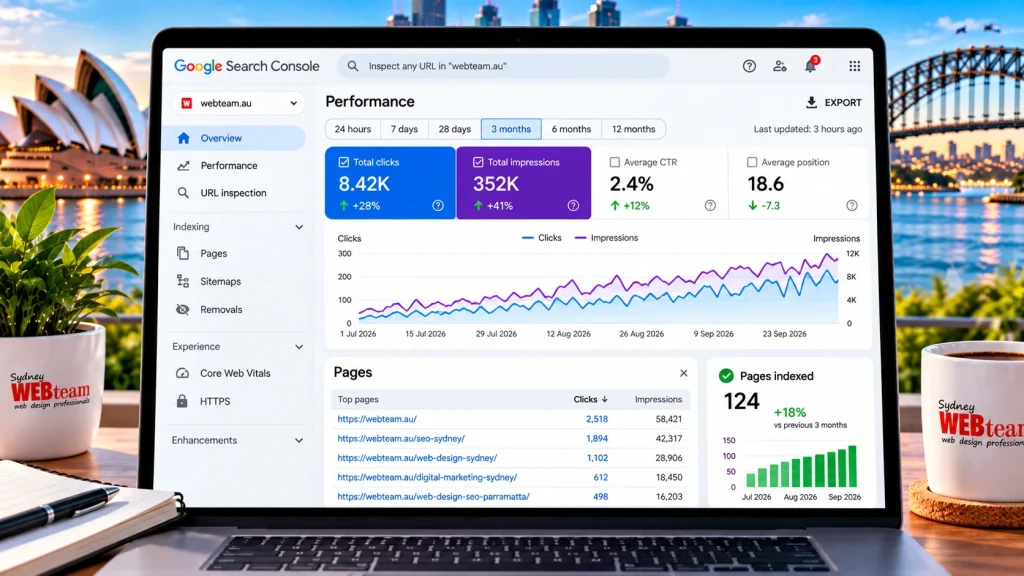
Track indexing, queries, impressions and conversions.
AI & GEO Readiness
Official Google and OpenAI guidance, plus a prompt test for your new site.
In This Article
01 Why SEO Should Start Before a New Website Launches
02 Plan Pages and Search Intent Before Design
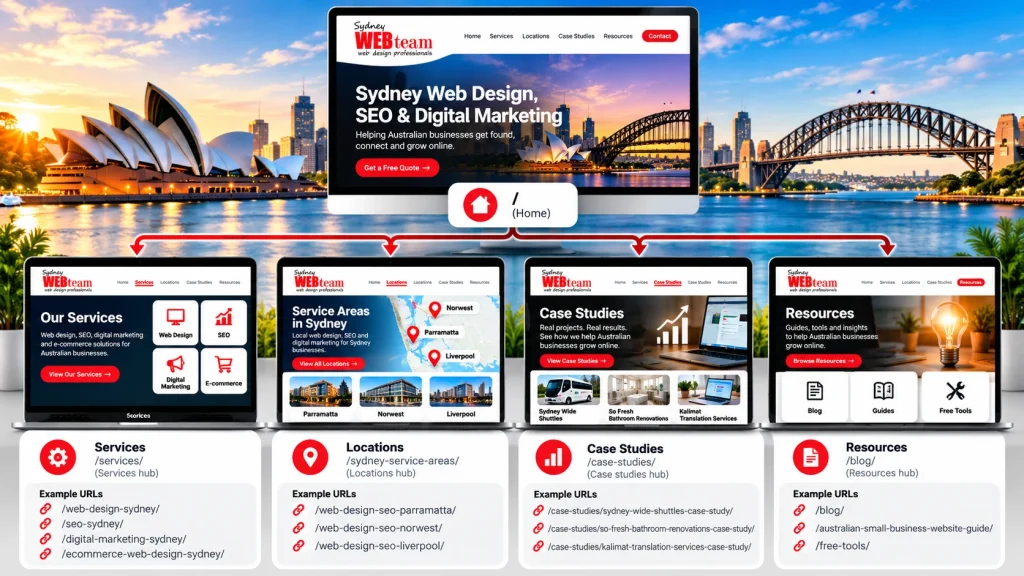
03 Plan the Site Structure, Navigation and URLs
05 Set Up Crawling, Indexing and Measurement Before Launch
06 Redesigning an Existing Website? Protect Existing Rankings
07 The Pre-Launch SEO Checklist
09 What to Monitor During the First 30–90 Days
10 Prepare the New Website for AI Search and GEO
11 AI Prompts: What People Ask and How to Test Your New Site
01 Why SEO Should Start Before a New Website Launches
This guide covers only what a business needs to know when launching or rebuilding a website. For ranking work on a live site, see our guide to ranking higher on Google in Sydney. For budgets, see our website cost guide and SEO cost guide. If you are planning a build, see our Web Design Sydney service.
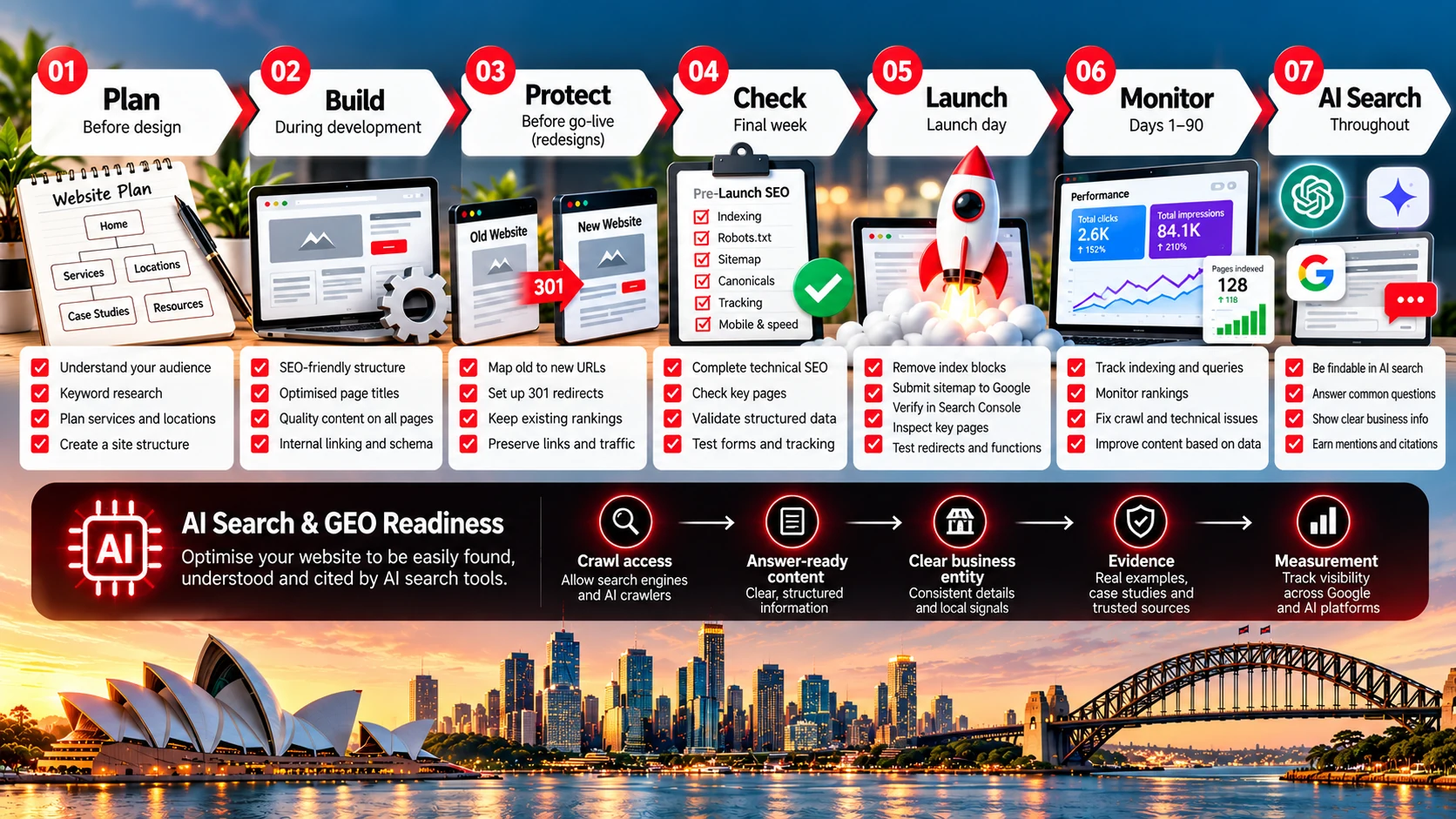
The launch roadmap at a glance
| Stage | When | Main goal | Section |
|---|---|---|---|
| Plan | Before design | Page map, structure and URLs | 02–03 |
| Build | During development | SEO built into pages; crawling and measurement set up | 04–05 |
| Protect | Before go-live (redesigns) | Keep existing rankings, links and traffic | 06 |
| Check | Final week | Pre-launch checklist | 07 |
| Launch | Launch day | Verify, submit and inspect | 08 |
| Monitor | Days 1–90 | Indexing, queries and enquiries | 09 |
| AI search | Throughout | Be findable and understandable by AI search tools | 10–11 |
02 Plan Pages and Search Intent Before Design
- its primary purpose and the visitor need it satisfies
- the service, product or location it represents
- the action you want the visitor to take
- which supporting pages will link to it
Check demand when you have no data yet
Avoid building many near-identical pages just to capture every wording. Google warns that doing so mainly to manipulate results can breach its scaled content abuse policy.
| Page | Primary intent | Role |
|---|---|---|
| SEO Sydney service page | Commercial | Explain the service and generate enquiries |
| SEO cost guide | Research | Answer pricing questions and support the service page |
| New website SEO guide | Informational | Help businesses launch or rebuild with SEO in place |
03 Plan the Site Structure, Navigation and URLs
URL rules to settle before launch
- Short, readable, lowercase URLs with hyphens that describe the page (see Google’s URL structure guidance).
- One live version of each page: choose https and either www or non-www, and redirect the other.
- Avoid dates, IDs and long parameters in URLs for pages meant to rank.
- Do not change URLs after launch without a reason, and redirect them if you must.
Choose the domain deliberately
Create location pages only for areas where you genuinely serve customers and can say something specific, as our Sydney service areas hub does.
04 Build SEO Into the Website
On every indexable page
- A unique page title and meta description written for that page, not a template.
- One clear H1 and a logical H2/H3 structure.
- Real links with descriptive anchor text (Google follows standard crawlable links).
- Compressed images with meaningful alt text and set dimensions.
- Real headings, lists and labelled form fields, not just styled text. This also helps screen readers and AI browsing agents.
Core content before launch
Speed and page experience
05 Set Up Crawling, Indexing and Measurement Before Launch
Crawling and indexing
- robots.txt must not block important sections (how robots.txt works).
- No accidental noindex. Pages must not carry a noindex tag. In WordPress, untick Settings, Reading, “Discourage search engines” when you go live.
- Canonicals should point to each page’s preferred live URL.
- XML sitemap should list only canonical, indexable URLs (build and submit a sitemap).
- HTTPS should work everywhere with no mixed content.
- Protect staging with a password, then remove it at launch, rather than relying on noindex alone.
Measurement and profiles
- Verify the domain in Google Search Console as early as you can so data starts on day one.
- Set up GA4 and mark the actions that matter (form submissions, calls, purchases) as key events. Test them with a real submission.
- Add the site to Bing Webmaster Tools, which can import from Search Console.
- Local businesses should set up and verify a Google Business Profile early, because verification can take time (see Google’s business details guidance). For local strategy, see SEO Sydney.
06 Redesigning an Existing Website? Protect Existing Rankings
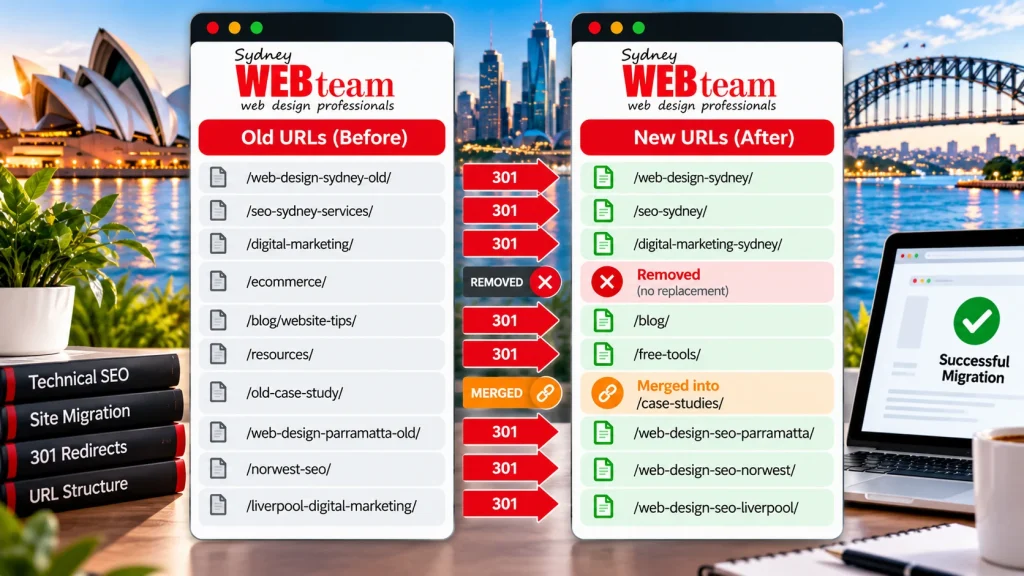
- Export every current URL, then mark pages with organic traffic, impressions, backlinks or conversions.
- Keep valuable content, titles and headings where the page still serves the same purpose.
- Map each old URL to its closest new equivalent in a spreadsheet.
- Set up 301 redirects from old to new URLs, not everything to the home page.
- Update internal links, canonicals and the sitemap so they use final URLs, not redirects.
- Crawl the staging site and test a sample of redirects before launch.
- After launch, check 404s and redirect errors in Search Console and fix gaps quickly.
| Situation | Action |
|---|---|
| URL stays the same | Keep it; carry over the content, title and H1 where it performs |
| URL changes | 301 redirect to the closest equivalent new page |
| Pages are merged | 301 redirect each old page to the merged page |
| Page is removed with no replacement | Redirect to the closest relevant page, or let it return 404/410 if truly gone |
From our website launch work
When Sydney WEB team launches or rebuilds a client website, we preserve important URLs wherever practical, map changed URLs before launch, test redirects, check crawl and indexing settings, verify analytics and Search Console tracking, and monitor the site after launch. This helps us identify migration, indexing and tracking issues early before they become longer-term SEO problems.
Common migration mistakes
- Redirecting every old URL to the home page.
- Changing URL structure without a reason.
- Leaving staging noindex or password protection on after launch.
- Blocking old URLs in robots.txt, which stops Google seeing the redirects.
- Dropping the content of pages that were already ranking.
Keep redirects in place for at least a year where possible. Read Google’s guidance on moving a site with URL changes and redirects and Google Search. Online stores should also read Google’s guide to launching an ecommerce website, and see ecommerce web design for builds.
07 The Pre-Launch SEO Checklist
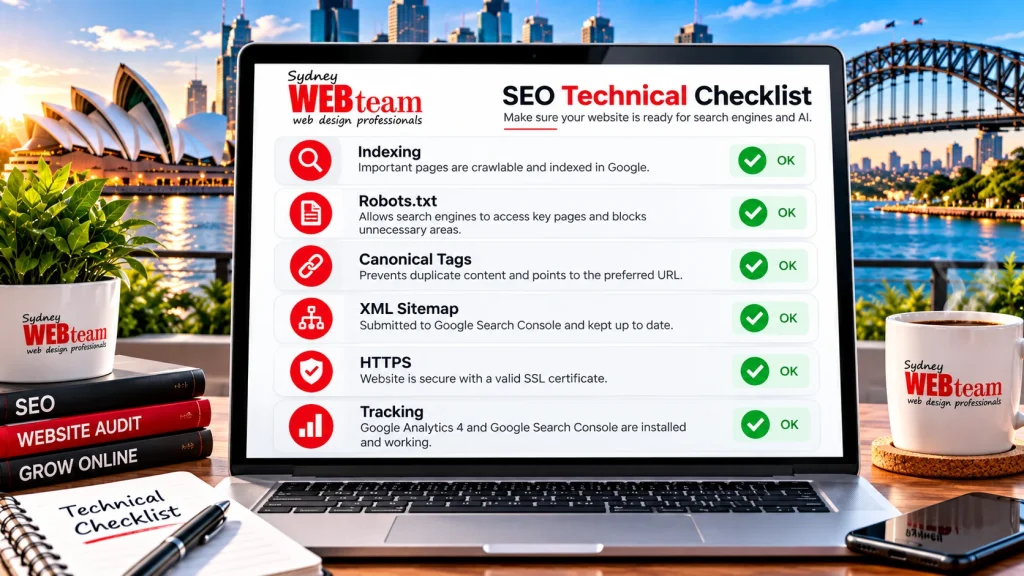
| Area | Check | Done |
|---|---|---|
| Indexing | Staging noindex and password removed; WordPress "Discourage search engines" unticked | □ |
| robots.txt | Does not block important sections or files needed to render pages | □ |
| Canonicals | Each page points to its preferred live URL | □ |
| Status codes | Key pages return 200; no soft 404s | □ |
| HTTPS and hostname | One preferred version; others redirect; no mixed content | □ |
| Sitemap | Lists only canonical, indexable URLs | □ |
| Titles and descriptions | Unique per page; no leftover template text | □ |
| Headings | One clear H1 per page | □ |
| Links | No broken internal links; menu and footer use final URLs | □ |
| Redirects | Old URLs tested (redesigns) | □ |
| Images | Alt text added, files compressed, dimensions set | □ |
| Mobile and speed | Tested on real phones; Core Web Vitals checked on key templates | □ |
| Forms and tracking | Enquiries reach the inbox or CRM; GA4 key events fire | □ |
| Structured data | Organization or LocalBusiness and breadcrumbs validated; matches visible text | □ |
| Crawler access | Firewall or CDN is not blocking Googlebot, Bingbot or OAI-SearchBot | □ |
| Business details | Name, address, phone and ABN consistent across site and profiles | □ |
08 The Launch-Day SEO Plan
- Remove staging restrictions (noindex, password, robots.txt disallow).
- Open the live robots.txt and sitemap in a browser.
- Check the home page and 3 to 5 key pages for a 200 status, correct canonical and no noindex.
- Submit the sitemap in Search Console (and Bing Webmaster Tools).
- Use URL Inspection on the home page and highest-value pages only.
- Test a sample of old URLs and confirm they redirect correctly (redesigns).
- Submit a real enquiry or test purchase and confirm the GA4 key event fires.
- Run the live URL through our Free SEO Checker.
- Record a baseline: speed scores, indexed pages and Search Console screenshots.
What not to do on launch day
- Do not request indexing for every URL.
- Do not change URLs, themes or page structure the same day.
- Do not switch off tracking while testing.
09 What to Monitor During the First 30–90 Days
| Period | What to check | Healthy sign | If not |
|---|---|---|---|
| Days 1–7 | Page indexing report and sitemap status | Key pages indexed; sitemap read without errors | Inspect URLs for noindex, canonical or robots issues |
| Weeks 2–4 | 404s, redirect errors and crawl problems | Few errors; old URLs resolve | Add missing redirects; fix broken links |
| Days 30–60 | Queries and impressions per page | The right pages appear for the right topics | Improve content depth, internal links and proof |
| Days 60–90 | Clicks, GA4 key events and AI prompt tests (section 11) | Impressions growing; first enquiries | Review page intent, authority and local signals |
10 Prepare the New Website for AI Search and GEO
What Google says about GEO
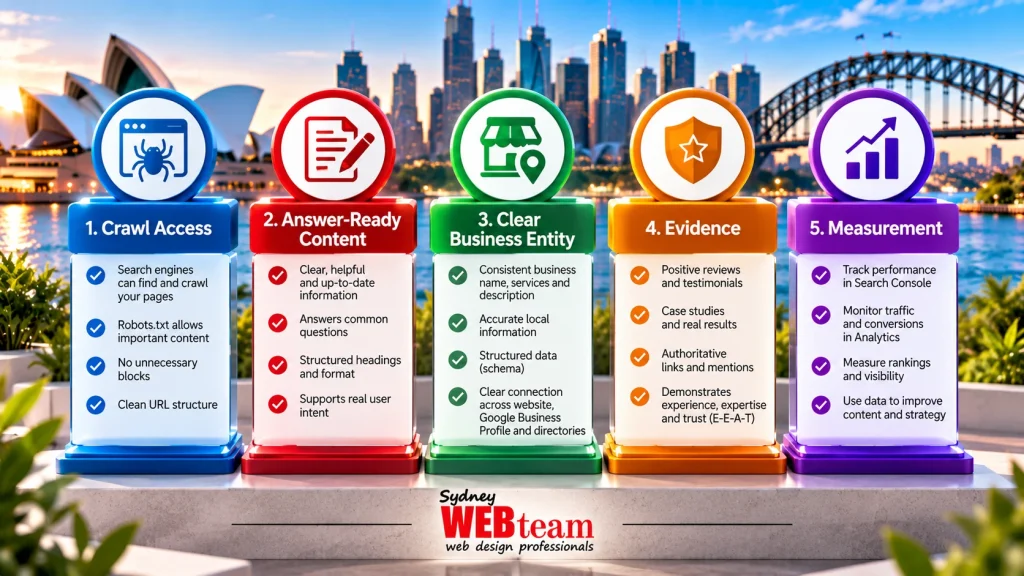
Let the right crawlers in
User-agent: OAI-SearchBot
Allow: /
Write answer-ready pages
- Put a short, direct answer under question-style headings, as this guide does.
- Be specific: services, areas, process, inclusions, timeframes and how you price.
- Add a unique point of view: your own projects, results and experience, not recycled advice. Google calls this non-commodity content.
- Show authorship or business identity and keep dates current.
Make the business clear as an entity
- Use the same name, address, phone and ABN everywhere, including your Business Profile (Google names it for local AI results).
- Publish clear About, Contact and service-area pages.
- Add Organization or LocalBusiness schema that matches visible content. It is not required for AI search, but it removes ambiguity.
What you can skip
- llms.txt files. Google Search ignores them. Creating one is harmless but will not help your Google visibility.
- Chopping content into tiny “chunks” or rewriting pages just for AI.
- AI-only or hidden pages, and buying fake “mentions”.
- Separate pages for every fan-out query, which risks scaled content abuse.
- Promises of guaranteed AI citations from anyone.
Prepare for AI browsing agents (optional)
Measure it
11 AI Prompts: What People Ask and How to Test Your New Site
| Stage | Example prompts | Page that should answer |
|---|---|---|
| Planning | Should SEO be done before or after building a website? | This guide; Web Design Sydney |
| Budget | How much does a new business website cost in Australia? | Website cost guide |
| Launch | What SEO checks should I do before launching a website? | Section 07 checklist |
| Redesign | How do I redesign my website without losing Google rankings? | Section 06; Web Design Sydney |
| Indexing | How long does a new website take to show on Google? | FAQ below |
| Local | Who can build and optimise a website for my Sydney business? | Service areas; SEO Sydney |
| AI search | How do I get my new business website to appear in ChatGPT? | ChatGPT guide |
| Trust | What should I ask a web designer about SEO? | FAQ below |
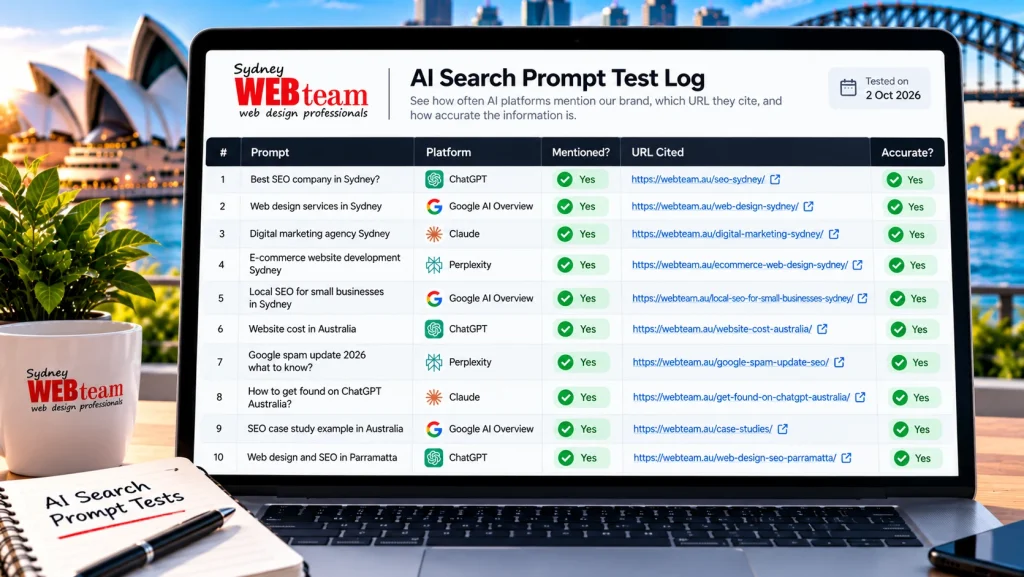
Prompts to test your own new site
- “Best [service] in [suburb or city]”
- “Who provides [service] for [customer type] in [city]?”
- “How much does [service] cost in [city]?”
- “What should I look for when hiring a [service provider] in [city]?”
- “Tell me about [your business name].”
- “Is [your business name] a good option for [service]?”
How to run the test
- Use the same wording each time and log the date, platform, prompt, whether you were mentioned, the URL cited and whether the facts were correct.
- Repeat at day 30, 60 and 90. Answers vary by person, location and time, so look for patterns, not single results.
- If facts are wrong, fix your pages and profiles. If you are not mentioned, strengthen content and proof for that topic.
12 New Website SEO FAQs
How long does a new website take to appear on Google?
Should SEO be done before or after web design?
Can a new website rank immediately?
Does changing my website design affect SEO?
Should every service have its own page?
Do I need to request indexing for every page?
How can a new website appear in ChatGPT or Google AI answers?
Do I need an llms.txt file or special AI markup?
Official Sources and Further Reading
- Google SEO Starter Guide — site organisation, links, content and search fundamentals.
- Google: Optimizing for generative AI features — official GEO and AI search guidance.
- Google: AI features and your website — how AI Overviews and AI Mode use Search.
- Google: People-first content — content quality guidance.
- Google: Build and submit a sitemap.
- Google: Introduction to robots.txt.
- Google: noindex.
- Google: Redirects and Google Search.
- Google: Move a site with URL changes.
- Google: Core Web Vitals.
- Google: How structured data works.
- OpenAI: Overview of OpenAI crawlers — OAI-SearchBot and GPTBot.
Planning a New Website or Redesign?
Build SEO into the project before launch rather than fixing avoidable problems afterwards. Sydney WEB team combines web design, technical SEO and search strategy for Australian small businesses.