
AI Search Readiness & GEO Prompt Strategy
For Australian Businesses
WHAT YOU’LL LEARN
Customer Prompt Research
Turn customer needs into realistic AI questions.
Prompt Mapping
Connect each question to the right page or asset.
GEO Content Gaps
Find missing proof, answers and comparisons.
Competitor Testing
Record who appears and what sources are cited.
30-Day Action Plan
Prioritise changes and measure them fairly.
In This Article
01 What Is AI Search Prompt Mapping?
02 Why Keywords Alone Miss Customer Intent
03 Build a Customer Prompt Library
04 Turn Prompts into a GEO Content Plan
05 Check Whether Your Pages Are Ready
06 Find Competitor Gaps Without Copying
07 Copy-and-Paste Prompts for GEO Research
08 Test and Score AI Visibility Consistently
09 How Many AI Search Prompts Should You Track?
10 Score Prompts by Commercial Intent
11 Prioritise Fixes with a Readiness Scorecard
12 Worked Example: Kalimat Translation Services
13 Example: 25 AI Prompts for a Sydney Business
14 A Practical 30-Day GEO Workflow
01 What Is AI Search Prompt Mapping?
Start here
Quick answer: AI search prompt mapping means writing down the questions your customers really ask, grouping them by what they’re trying to decide, testing how AI tools answer them, and matching each gap to a page on your site. It’s a way to plan and measure your work. It won’t guarantee a recommendation, and there’s no secret ranking factor behind it.
For most Australian businesses the questions fall into four buckets: who can do this near me, how do I compare my options, what will it cost, and can I trust this business. If your website can’t answer them, the customer (or the AI tool) will find the answer somewhere else.
This guide sticks to that research workflow. If you want the platform side, we’ve covered it in our guide to getting found on ChatGPT and our guide to Google AI Overviews and AI Mode.

02 Why Keywords Alone Miss Customer Intent
- Discovery: who offers this service?
- Comparison: how do the options differ?
- Problem: something is broken or urgent.
- Local: my suburb, my distance, my state’s rules.
- Trust: can I believe this business?
- Action: what do I do next, and what will it cost?
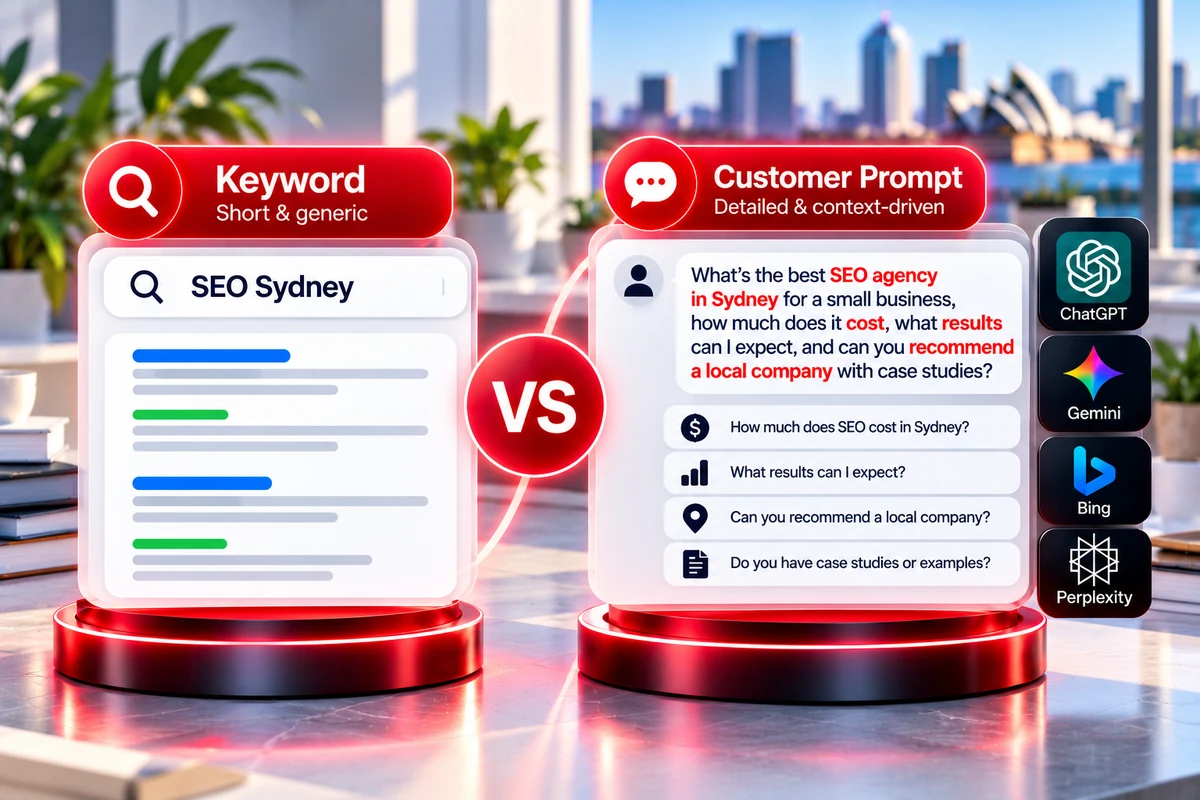
Take “SEO Sydney”. It’s a good keyword, but a real buyer might ask, “Which SEO agency in Sydney suits a small trade business, what should I get, and how will I know it’s working?” That’s really four questions: who, what’s included, what proof, and how to measure it.
Don’t assume people search that exact sentence often, or that AI tools split it up the same way every time. Treat each prompt as a guess to check against enquiries, sales calls, Search Console and real AI answers.
Keep doing keyword research. It just shouldn’t be the only thing you look at.
03 Build a Customer Prompt Library
Recommended starting point
Start with 15 to 30 prompts across a handful of categories. Only add the location, business size or budget when it would change the answer. If a prompt came from a real customer, keep their wording. If you made it up, mark it as a guess.
Where real questions come from. Don’t brainstorm them in a meeting room. Your customers have already told you:
- Enquiry forms, emails and call notes. Copy the customer’s exact words.
- Questions your sales or service team answer before every quote.
- Google Business Profile questions and review text, complaints included.
- Search Console queries that read like full questions.
- Your site search, live chat and support tickets.
- Competitor FAQ pages, as a source of ideas only. Don’t copy them.
Privacy reminder
Strip out names, phone numbers and other personal details before you paste anything into a spreadsheet or an AI tool. You need the question, not the person.
The table below uses real search queries from our Kalimat Translation Services case study, plus a few questions we’d still need to test. Search Console queries are a good source of prompts because they show how people really phrase things. Swap in your own industry and service area.
| Prompt label | Example prompt | Where it came from | Page that should answer it |
|---|---|---|---|
| Language need | arabic naati translator | Search Console query (avg. position 15.1) | Arabic NAATI translation page |
| Smaller city | naati darwin | Search Console query (avg. position 6.6) | NAATI Darwin location page |
| Big city | naati translation sydney | Search Console query (avg. position 18.5) | NAATI Sydney location page |
| General question | what languages are spoken in australia | Search Console query (avg. position 6.2) | Languages Spoken in Australia guide |
| Document type | Who can do a NAATI certified translation of my academic transcript? | Hypothesis to test | Certified academic transcript translation page |
| Trust | How do I know a translator is NAATI certified? | Hypothesis to test | Core NAATI translation page |
Keep it easy to use. Give every prompt a short label, like “naati darwin”, and note where it came from (a real customer, a Search Console query or your own guess), the page that should answer it, the date and platform you tested, what the AI said, which sources it cited, whether your business showed up and what you’ll do next. Keep the list internal. Publishing it won’t make up for good content.
Practical research sequence
Use a repeatable research sequence: (1) export relevant queries from Google Search Console and keep the date range; (2) review enquiry forms, sales calls and support questions; (3) inspect autocomplete, People Also Ask and keyword tools for additional wording; (4) review customer feedback and competitor FAQs for unanswered needs; and (5) label each item as observed evidence or a hypothesis.
Search Console reports Google Search queries, not the prompts people enter into ChatGPT or other AI assistants. Use it as a source of customer language, then test the selected prompts directly on each AI platform.
04 Turn Prompts into a GEO Content Plan
- Group prompts that come down to the same need.
- Give each group one main page.
- Note what that page is missing: facts, examples, comparisons or proof.
- Improve the existing page before you create a new one.
- Link to supporting detail from the main page where it helps the reader.
- Give every action an owner, a priority and a review date.
Kalimat’s site shows what this looks like in practice. Instead of one broad service page, every kind of search has its own destination: a core NAATI translation page, language pages, pages for each document type (legal, medical, academic, immigration, business) and a page for each city. Every page follows the same service, language, document and location logic, so new pages slot in without reorganising the site.
It also shows why the grouping matters. In the Search Console data, “naati darwin”, “naati hobart” and “naati canberra” average positions between 6.6 and 11.3, while “naati translation sydney”, the most competitive market, averages 18.5. Those are averages from the case study, not guaranteed rankings.
On our own site, each resource has a job too. SEO services in Sydney is the commercial page, SEO Cost Sydney covers pricing, and How to Rank Higher on Google in Sydney explains the wider approach.
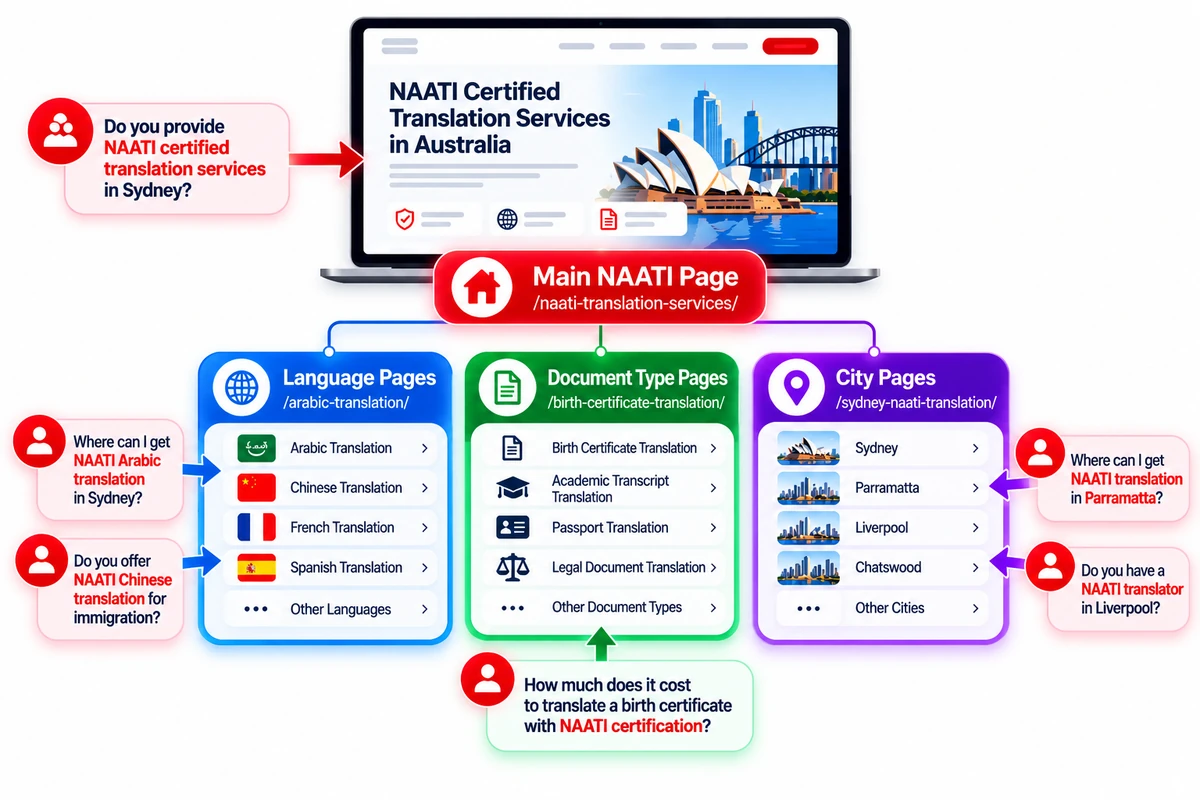
| Prompt group | Main page | Supporting content | What to do |
|---|---|---|---|
| Language need | One page per language, such as Arabic | Core NAATI translation page, document pages | Say which documents and certification the page covers |
| City or location | One page per city | Core NAATI translation page | Keep the same page structure so new cities slot in |
| Document type | One page per document type | Language and location pages | Link each page to the languages and cities it applies to |
| General question | Informational guide, such as languages spoken in Australia | Links to the core translation pages | Answer the question directly, then point to the service |
| Trust and proof | Core NAATI page or credentials content | Case study, reviews | Add proof people can verify, such as named people and dates |
05 Check Whether Your Pages Are Ready for the Prompts
What to check next
Use this table to decide what to fix first. It’s a planning aid. No page format guarantees an AI citation.
| What the customer wants | What to check on the page | Common gap |
|---|---|---|
| Understand the service | Plain-English explanation, what’s delivered, the process and the limits | Vague claims that don’t say what you actually deliver |
| Compare providers | Relevant experience, what makes you different, who you’re a good fit for, proof | “Best quality” with nothing to back it up |
| Understand cost | What changes the price, what’s included and left out, ongoing costs | No explanation of what moves the price |
| Check they can be trusted | Named people or business details, dated examples, sources | Statistics with no source, or generic testimonials |
| Take the next step | A clear next step, a way to get in touch, and how to decide | A call to action that ignores the buyer’s questions |
Technical checks like crawling and indexing belong in your normal SEO routine. This article is about matching content to customer questions. For the Google-specific side, see our Google AI Overviews and AI Mode guide.
If you’re planning GEO work for your business, our guide to AI search optimisation costs in Australia explains the factors that affect pricing and what to consider when comparing packages.
06 Find Competitor Gaps Without Copying Them
Important: learn, don’t copy
- Write down which brands the AI names for each prompt.
- Note the sources it cites, when it shows any.
- Look for what keeps coming up: examples, prices, scope, specialist detail.
- Compare that with what your own pages say and prove.
- Pick gaps you can fill honestly, with something only you can say.
- Never invent a competitor’s weakness, and never lift their wording.
Keep your testing consistent
Use the same prompt on the same platform, and note the date, where you tested from and the exact wording. AI answers change between runs, accounts, locations and product versions, so a single answer tells you very little.
Being named doesn’t mean a business ranks above everyone else, and a cited page didn’t necessarily cause the mention. Write down what you saw, then write down what you think it means, in separate columns. Patterns across a consistent set of prompts are what count.
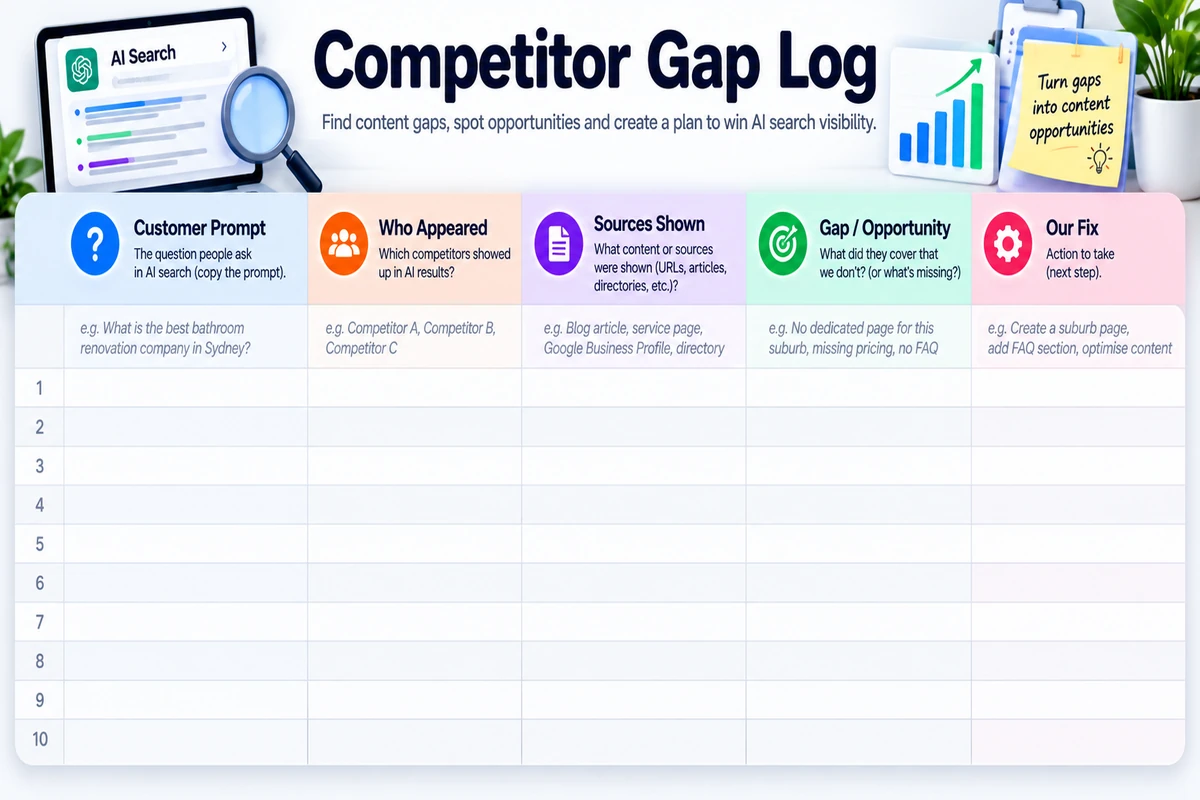
| Column | What to write | Keep out of it |
|---|---|---|
| Prompt | The label and the exact wording you used | Rewording it between tests |
| Who appeared | Every brand named, and how the answer describes it | Guesses about why they were chosen |
| Sources shown | Each URL cited, yours and your competitors’ | Sources you assume were used but weren’t shown |
| What they showed that we don’t | Specifics: prices, process, credentials, examples | Vague notes like “better content” |
| What we’ll do | One page and one change, with an owner and a date | A new page for every gap |
Log what you actually saw and keep your opinions in a separate column. You’re looking for proof, detail or clarity that buyers need and your site doesn’t give yet. You’re not trying to match a competitor page for page.
We haven’t filled in a sample log here, because the answers depend on your market and the AI tool you test. Run your own prompts and fill in what you actually see.
07 Copy-and-Paste Prompts for GEO Research
Use AI carefully
- “List the main decisions a customer makes before hiring a [service] provider in [location]. Separate verified facts from assumptions.”
- “Group these customer questions by intent: discovery, comparison, cost, trust and action. Tell me why you grouped each one that way.”
- “Check this page against the customer questions below. Tell me which ones it doesn’t answer and what proof is missing. Don’t rewrite it yet.”
- “Compare these two page outlines on topic coverage and evidence. Don’t copy wording, and don’t assume either one ranks better.”
- “Set up a prompt-testing spreadsheet with columns for prompt label, intent, platform, date, brand mention, cited URL, evidence and next action.”
- “Suggest 10 questions a customer might ask before buying [service]. Mark them as guesses unless the data I gave you supports them.”
- “Read this page as a sceptical customer. Which claims wouldn’t you believe without proof, and what proof would convince you?”
- “From these AI answers and cited URLs, list only what you can actually see. Put your interpretation in a separate section and label it as a guess.”
Avoid unreliable AI data
One warning: don’t ask an AI tool to make up search volumes, competitor citations, reviews or results. Give it the data you have and ask it to say where it’s unsure. A good prompt gives you something you can check, not something that merely sounds confident.
For ChatGPT setup and visibility, see our Get Found on ChatGPT Australia guide. Here we’re using prompts for research and planning, so we won’t repeat the platform steps.
Reusable AI prompt research template
Copy this into your AI assistant and replace the bracketed fields. Provide real source data where available; do not ask the model to invent search volumes, competitor citations or business credentials.
ROLE: Act as an AI search prompt research and GEO strategist.
BUSINESS: [business name], [website], [industry], [services], [locations], [ideal customers], [differentiators], [competitors].
TASK: Create 60 distinct customer questions across service discovery, local recommendations, pricing, comparisons, problems, trust and brand queries. Use the supplied Search Console exports, customer questions, reviews and competitor notes as evidence. Clearly label inferred prompts as hypotheses.
SCORE: Rate each prompt 1–5 for commercial intent, service relevance, geographic relevance and evidence of demand. Do not fabricate search volumes.
OUTPUT: Prompt ID, exact wording, category, intent, target location, four scores, evidence source, supporting URL, content gap, recommended action and tracking priority.
FINAL CHECK: Remove duplicates, separate branded from unbranded prompts, select the top 25 for an initial tracking set, and identify whether each prompt should map to an existing page or a genuine content gap.
08 Test and Score AI Visibility Consistently
Pick 15 to 30 prompts that match your most valuable customer needs. Run them on the AI tools your customers are likely to use, keep the wording identical each time, and note the date and where you tested from. For the important ones, run them more than once rather than trusting a single answer.
Track things you can actually observe: whether your business is mentioned, whether your site is cited and which URL, whether the description is accurate, which competitors show up, and whether the answer suits the question. Don’t roll these into one “AI ranking” number unless you’ve defined exactly how it’s worked out.
Search Console shows how you perform in Google search, and its Generative AI Features report shows impressions by page, country and device. It doesn’t list the queries behind those impressions, and it doesn’t cover other AI assistants. In the Kalimat case study it showed 7,840 AI impressions across 45 pages, which tells us which pages are surfacing but not which prompts triggered them. Keep your organic search numbers, your Search Console AI data and your own prompt tests in separate places.
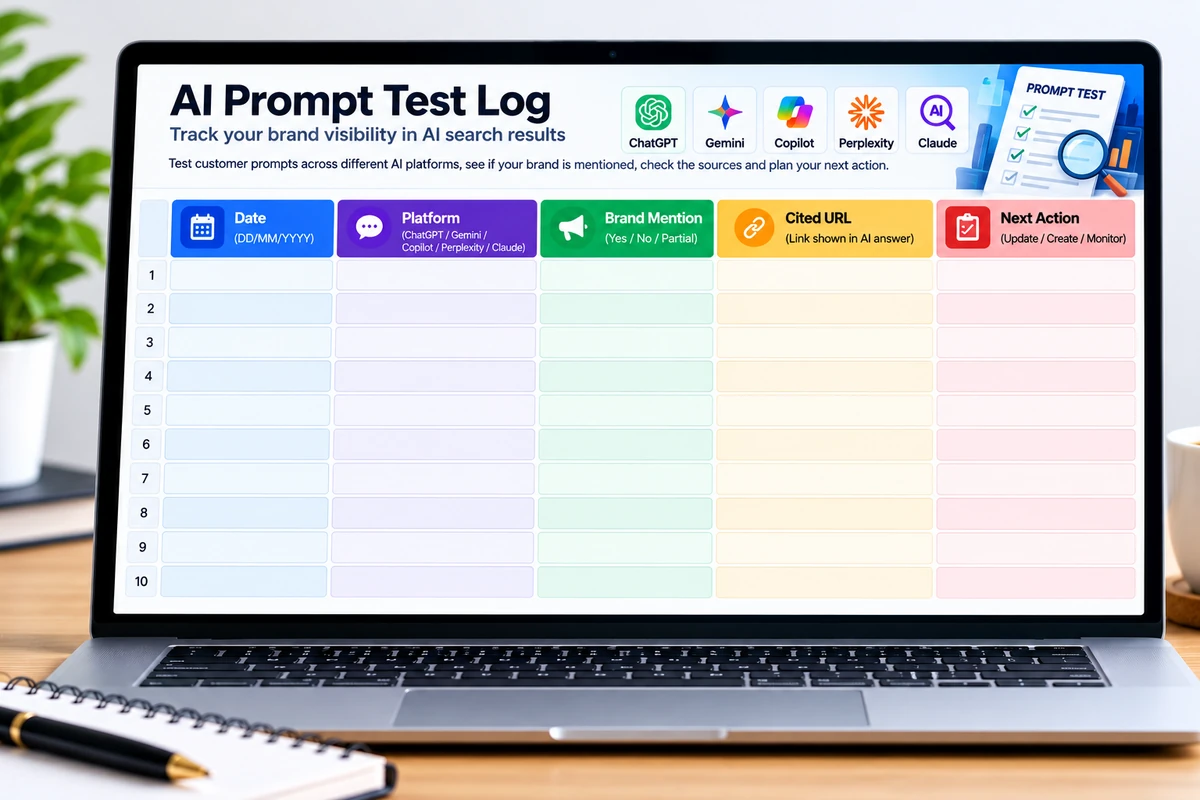
| Field | What to write down | Why it matters |
|---|---|---|
| Prompt label and exact wording | The text you entered, unchanged | So you can repeat the same test later |
| Platform, date and location | Which AI tool, when, and that you tested from Australia | Answers vary by product, time and place |
| Brand mention | Mentioned, not mentioned, or described wrongly | Visibility and accuracy are different things |
| Cited sources | Every URL shown, yours and your competitors’ | Shows which pages the AI draws on |
| Competitors named | Who appears and how they’re described | Feeds your competitor gap log |
| Next action | The page to improve, the proof to add, or “no action” | Turns an observation into work |
| Measure | How to record it | Watch out for |
|---|---|---|
| Mention rate | Prompts where you appear ÷ prompts tested, per platform | Use a fixed prompt set so months are comparable |
| Citations of your pages | Which of your URLs are cited, and for which prompt groups | A citation shows visibility, not that the page caused a recommendation |
| Accuracy | Whether your services, locations and prices are described correctly | Fix factual errors on your own site first |
| Organic search data | Search Console clicks, impressions and queries for the mapped pages | Report it separately from your AI tests |
| Google AI impressions | Search Console Generative AI Features report, by page, country and device | No query data, and impressions aren’t clicks or leads |
| AI referral visits | Analytics sessions from AI assistants, where the referrer is passed on | It undercounts, because some visits arrive with no referrer |
| Enquiry quality | Do enquiries mention the questions you mapped? | Ask new customers how they found you |
Run each important prompt more than once and look at the pattern across the whole set. If you appear in 3 of 20 prompts one month and 6 of 20 after updating a page, that’s worth noting. It doesn’t prove the update caused it.
Compare platforms separately. Use the same wording and record ChatGPT, Google AI search features and Perplexity as separate columns or test records. Their responses, source links and available features can differ. For Google AI features, record the specific feature and search context observed; do not assume every query triggers an AI Overview. Where practical, repeat important prompts and report the number of runs.
09 How Many AI Search Prompts Should You Track?
Choose the number of prompts based on the client’s service range, locations, competition and reporting budget—not because a larger list automatically produces better results. Keep a stable core set for month-to-month comparison and add or replace prompts only when there is a clear reason.
| Use case | Prompt set | What it suits | Suggested review |
|---|---|---|---|
| One-off audit | 20 prompts | A focused baseline for one main service or a small business | Baseline plus prioritised action plan |
| Starter monitoring | 25 prompts | One core service, a limited service area and a small set of buying questions | Monthly |
| Growth monitoring | 50 prompts | Several services, a wider local area or more comparison and pricing prompts | Monthly |
| Advanced monitoring | 100 prompts | Multiple services, locations or customer segments with enough capacity to analyse results | Monthly, with quarterly prompt review |
Count your tests correctly
Count tests accurately. Twenty-five prompts tested on three platforms create 75 prompt-platform observations per round. That is not the same as 75 unique prompts. Define which platforms are included, whether each prompt is run once or repeated, and how results are recorded. Start with a manageable list and expand only when the extra coverage supports a decision.
10 How to Score AI Prompts by Commercial Intent
Prioritise prompts that connect a real customer need with a service the business can deliver. Use the same scoring rules across clients so the decision is transparent. This is an internal planning framework, not an industry-standard ranking score.
| Criterion | Score | How to judge it |
|---|---|---|
| Commercial intent | 0–5 | Does the question suggest comparing providers, budgeting, hiring or taking the next step? |
| Service relevance | 0–5 | Does the business genuinely provide the service or solution asked about? |
| Geographic relevance | 0–5 | Does the question match the locations the business actually serves? |
| Evidence of demand | 0–5 | Is it supported by customer enquiries, search data, keyword research, reviews or repeated sales questions? |
| Total | Priority | Action |
|---|---|---|
| 16–20 | High | Include in the core tracking set if it is relevant and testable. |
| 11–15 | Medium | Include when it covers a useful supporting intent or service. |
| 6–10 | Selective | Keep only if strategically important or needed for coverage. |
| 0–5 | Low | Usually deprioritise unless there is a clear business reason. |
Example: “How much does SEO cost in Sydney for a small business?” could score 5 for commercial intent, 5 for service relevance, 5 for location relevance and 4 for evidence of demand, for a total of 19/20—if the business data supports those ratings. Record the evidence behind the score instead of treating the number as objective fact.
Keep prompt priority separate from page readiness. A high-value prompt can still map to a page that needs better pricing information, proof, clearer service details or a more useful next step.
11 Prioritise Fixes with a GEO Readiness Scorecard
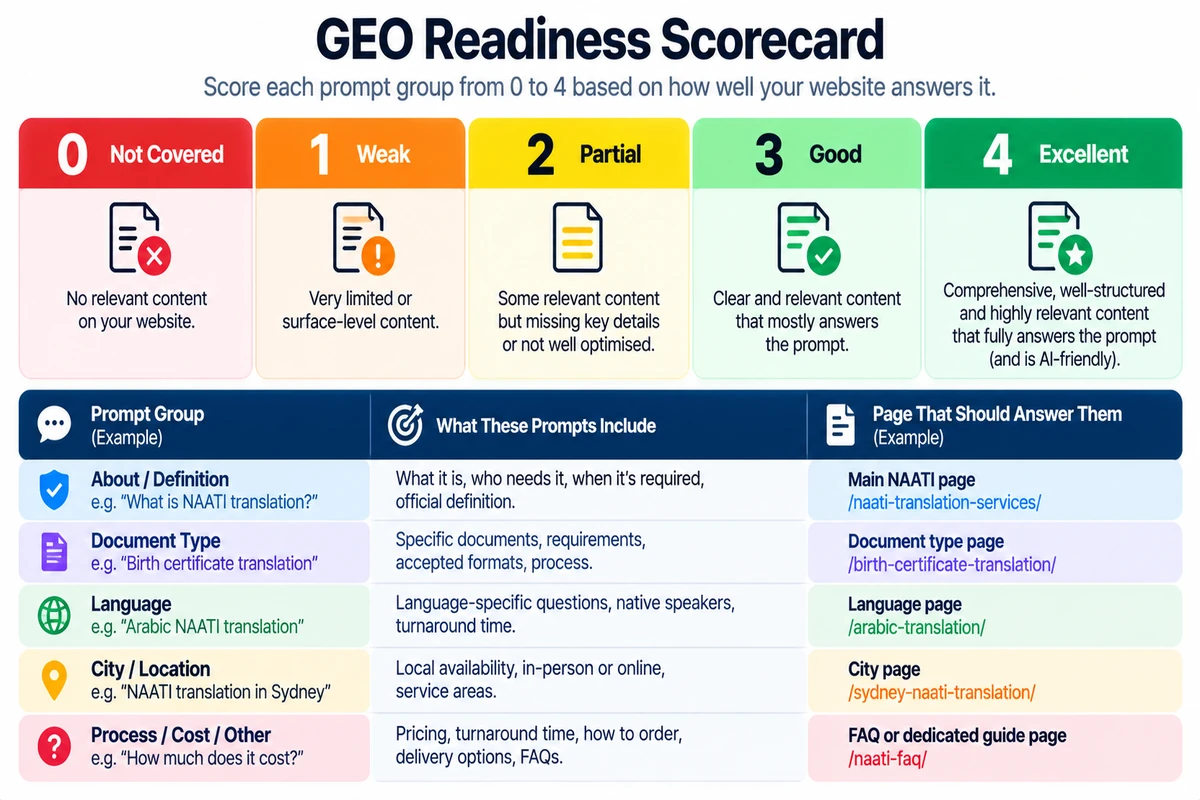
- 0: No relevant page or proof exists.
- 1: There’s a page, but the answer is vague or incomplete.
- 2: The answer is clear, but there’s little proof behind it.
- 3: Clear answer, backed by relevant proof.
- 4: Answers the need well and links to useful supporting pages.
- Wrong facts or broken pages go on a separate, urgent list.
How to prioritise fixes
To decide what to fix first, ask three things. Does this prompt matter to the business? Is the gap real, and can you show it? Can you fix it without duplicating another page? A high-value prompt with an obvious gap should come before a low-value one that hardly ever comes up with customers.
Remember the score is for your own planning. Google and the AI platforms don’t use it.
A local example. In our So Fresh Bathroom Renovations case study, “bathroom renovations castle hill” had 4,269 impressions at an average position of 36.7. “Bathroom renovations glenwood” averaged 7.3 on far fewer impressions (625). Same service, very different positions. A prompt group with high demand and a visible gap is where a low score should be fixed first. These are Search Console averages, so use them to pick priorities, not as proof of cause.
12 Worked Example: Kalimat Translation Services
- The question: “What languages are spoken in Australia?” People ask this long before they need a translator.
- The page: one dedicated guide, Languages Spoken in Australia, answers it directly.
- Search results: question searches like this average positions between 3.4 and 8.2 in Search Console.
- Scale: 124,007 impressions and 282 clicks. Question searches are often answered on the results page, so impressions run far ahead of clicks.
- AI visibility: 6,097 of the site’s 7,840 Google AI impressions (77.8%) came from this page.
- What it means: a clear answer to a real question gave the site visibility well beyond its commercial pages. That’s visibility, not leads.
Notice what this doesn’t prove. It doesn’t show that the page causes AI mentions, and impressions aren’t enquiries. What it does show is why matching real questions to pages is worth the effort: one page that answered a real question clearly ended up carrying most of the site’s AI visibility.
On a real project, keep a dated copy of each original AI answer, the sources it showed, the page change and the retest. That makes it much easier to tell a real pattern from normal variation. You can read the full numbers in the Kalimat case study.
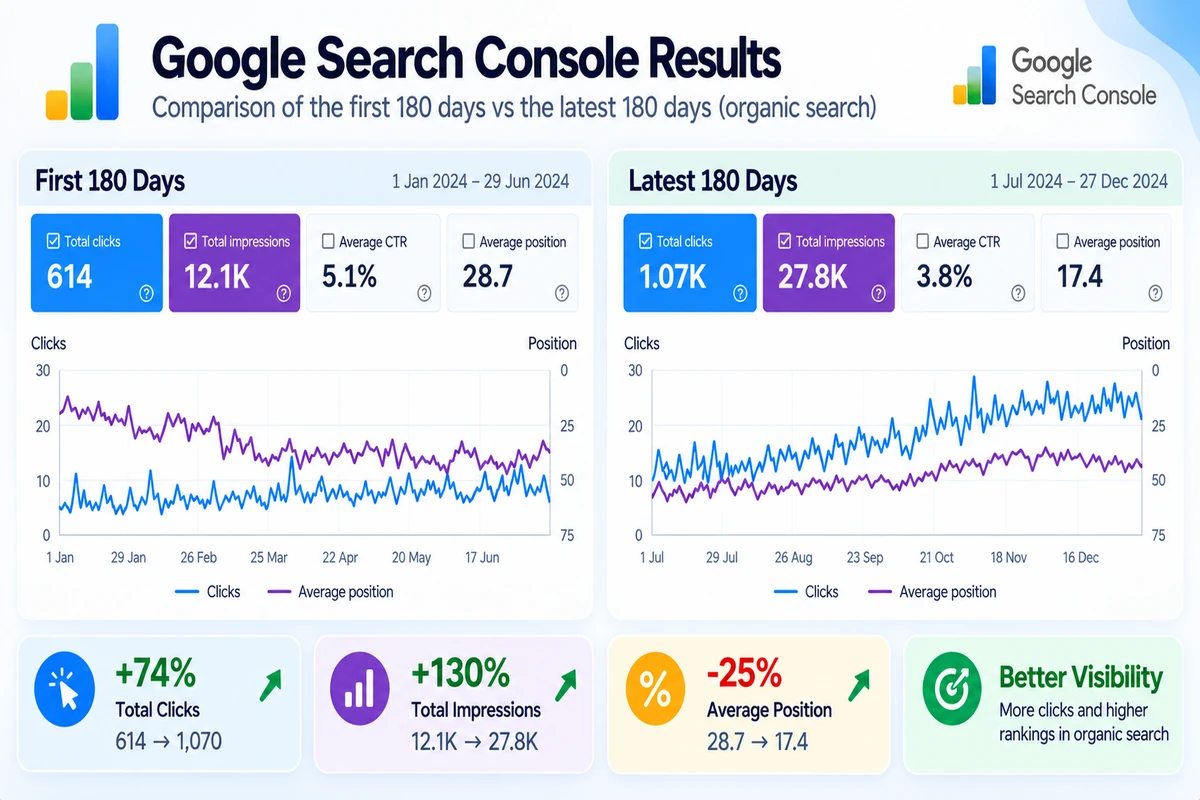
| Measure | First 180 days | Latest 180 days |
|---|---|---|
| Organic clicks | 216 | 377 (+74.5%) |
| Average position | 41.08 | 19.16 |
| Click-through rate | 0.169% | 0.277% |
These are whole-site results from web design, SEO and content work together, so they don’t isolate the effect of prompt research. Average position is a site-level weighted measure, not the current ranking of every keyword.
13 Example: 25 AI Search Prompts for a Sydney Business
This example shows how a business can build a balanced set rather than tracking 25 near-identical “best plumber” variations. These prompts are illustrative hypotheses, not verified search-volume data. Replace them with the client’s actual services, suburbs, customer wording and evidence.
| Category | Example prompt | Intent | Page to review |
|---|---|---|---|
| Local discovery | Which plumbers service Parramatta? | Local provider discovery | Parramatta service page |
| Local discovery | Who provides reliable plumbing services in Western Sydney? | Provider comparison | Service areas page |
| Emergency | Who can help with an urgent plumbing problem in Merrylands? | High-intent local | Emergency plumbing page |
| Emergency | Which plumbers offer after-hours call-outs in Sydney? | Service availability | Emergency plumbing page |
| Pricing | How much does an emergency plumber cost in Sydney? | Pricing | Emergency plumbing pricing guide |
| Pricing | What affects the cost of fixing a leaking pipe? | Budget research | Leaking pipe service page |
| Pricing | Do plumbers charge a call-out fee in Western Sydney? | Pricing comparison | Pricing or FAQ section |
| Problem solving | What should I do if a pipe bursts at home? | Urgent problem | Burst pipe service page |
| Problem solving | How can I tell whether a water leak is hidden? | Problem diagnosis | Leak detection page |
| Problem solving | Why does my hot-water system keep losing hot water? | Problem diagnosis | Hot-water service page |
| Service discovery | Which plumber can repair a hot-water system in Parramatta? | Local service discovery | Hot-water service page |
| Service discovery | Can a plumber detect leaks without damaging walls? | Service capability | Leak detection page |
| Comparison | How do I compare plumbing quotes fairly? | Provider comparison | Quote or service guide |
| Comparison | What should be included in a plumbing quote? | Purchase evaluation | Quote or pricing guide |
| Comparison | Should I repair or replace an old hot-water system? | Solution comparison | Hot-water guide |
| Trust | How do I check whether a plumber is licensed in NSW? | Trust and verification | Credentials or FAQ page |
| Trust | What should I look for in plumbing reviews? | Trust research | Reviews or testimonials page |
| Trust | What guarantees should I ask about before plumbing work starts? | Risk reduction | Guarantees or service terms page |
| Location | Which plumber services Merrylands and nearby suburbs? | Local coverage | Merrylands service page |
| Location | Do plumbers in Parramatta service small commercial premises? | Business service fit | Commercial plumbing page |
| Commercial | Who handles plumbing maintenance for Sydney offices? | B2B service discovery | Commercial plumbing page |
| Commercial | How often should a business schedule plumbing maintenance? | B2B information | Commercial maintenance guide |
| Brand | Is [Business Name] licensed and insured? | Branded trust | Credentials page |
| Brand | What plumbing services does [Business Name] offer in Western Sydney? | Branded service discovery | Main services page |
| Next step | What information should I provide when requesting a plumbing quote? | Conversion support | Contact or quote page |
How to use this list
Verify service coverage and licensing claims, score each prompt, map it to the best existing page, then test it separately on the chosen AI platforms. If several prompts map to the same page, improve that page before creating a new URL. Do not create suburb pages unless the business genuinely serves those areas and each page can provide useful, distinct information.
14 A Practical 30-Day GEO Workflow
- Week 1: Collect customer questions from enquiries, sales calls, reviews and Search Console, and build 15 to 30 prompts with short labels.
- Week 2: Test the prompt set, record mentions and cited sources, and fill in the competitor gap log.
- Week 3: Map prompts to pages, score them, and improve one or two high-value pages with clearer answers and proof people can verify.
- Week 4: Retest the same prompts, compare against your baseline, and decide what to keep, change or look into next.
- After day 30: Retest monthly, refresh the library every quarter, and only add prompts for genuinely new customer needs.
- Throughout: Keep dates, URLs and screenshots, and keep measured results separate from assumptions.
Set realistic expectations
Don’t expect a guaranteed ranking lift in 30 days. The first month is for setting a baseline, finding practical gaps and building a routine you can repeat. Search results and AI answers move for reasons outside your control, so report what you find honestly and keep testing over a longer stretch.
15 How Sydney WEB team Uses Prompt-Led GEO
At Sydney WEB team we treat prompt testing as one input alongside SEO, useful content, local relevance and proof. It doesn’t replace technical SEO or talking to real customers.
When we run this research for a client we ask a few simple things. What does the customer need to understand? What proof backs up the claims? Which page should answer the question? What needs to change? The result might be a better service page, a clearer pricing explanation, a case study, stronger internal links or a measurement plan.
You can see how this plays out in our Kalimat Translation Services, So Fresh Bathroom Renovations and Sydney Wide Shuttles case studies.
For the foundations, start with our SEO services in Sydney. For the platform side, read Get Found on ChatGPT Australia and Google AI Overviews and AI Mode SEO. Those cover how each platform works. This page covers the research and the action plan.
16 AI Prompts and GEO FAQs
What is an AI search prompt library?
A list of real customer questions that you use to research what people need, test AI answers and find gaps in your content.
How many prompts should a small business test?
Start with 15 to 30 across discovery, comparison, cost, trust and action. Only add more when they cover a genuinely different customer need.
Does GEO guarantee that AI will recommend my business?
No. Prompt mapping and better content can help you find and fix gaps, but AI answers vary and nobody can honestly promise a citation or recommendation.
Should I create a page for every prompt?
No. Group similar questions and match them to the best existing page. Only create a new page when it has its own purpose and adds something the others don’t.
Can Google Search Console measure every AI prompt?
No. Search Console shows how you perform in Google search, but it isn’t a prompt-by-prompt report across every AI assistant.
How often should I retest prompts?
Monthly is a sensible starting point, plus a retest after any meaningful content change. Write down the date and context each time, because answers vary.
Do I need paid tools to track AI visibility?
Not to get started. A spreadsheet, a fixed prompt set and consistent manual tests are enough for a baseline. Paid tools can help at scale, but check how they run prompts and what they actually measure.
How is this different from optimising for a specific AI platform?
Platform guides explain how one product finds and shows answers. Prompt mapping sits underneath: which customer questions matter, what proof your pages need, and how you measure change.
How do I find the AI prompts customers use to find a business?
Start with customer enquiries, sales calls, reviews, site-search terms and Google Search Console queries. Turn them into natural questions customers might ask an AI assistant, then group them by service, location, problem, budget, comparison and trust.
How do I identify gaps in the AI prompts my website should answer?
Compare a focused set of customer prompts with your existing pages and the answers AI tools provide. Look for missing service details, location relevance, pricing guidance, proof, comparisons and clear answers. Map related prompts to the best existing page before creating anything new.
How often should I test my business in ChatGPT, Google AI Overviews and Perplexity?
Monthly is a practical starting point, with additional tests after important page updates. Use the same prompts and record the date, platform, whether your business appeared, which pages were cited and which competitors were mentioned. Results can vary between runs.
How can I measure whether GEO improvements increase AI visibility?
Compare repeated tests over time and track whether your business is mentioned, recommended or cited; which pages are referenced; and how often relevant competitors appear. Combine these observations with website enquiries, referral traffic and organic search data where available. Treat prompt tests as directional evidence, not a guarantee of rankings or leads.